
You click Play, the game loads in seconds, and you are already racing, matching, building, or blasting through a quick level. That speed is part of the fun, but it is also why knowing how to play games safely matters. When games are easy to start, it is just as easy to ignore privacy settings, weird pop-ups, or play longer than you planned.
The good news is that safe gaming does not have to feel like homework. A few smart habits can keep online play fun, low-stress, and family-friendly without killing the vibe. Whether you are a kid jumping into a puzzle game, a teen joining multiplayer matches, or a parent checking what is safe for your child, the basics are simple.
Start with the platform. Browser games, mobile games, and console games all come with different risks, but the first rule stays the same: play on sites and apps that look legitimate, work cleanly, and do not push sketchy downloads. If a game page is packed with fake buttons, surprise redirects, or prompts that feel off, back out fast.
A safe game experience usually feels boring in the best way. The game loads, the controls work, and nothing tries too hard to get your personal info. That is what you want.
It also helps to keep your device updated. Your browser, operating system, and security tools patch known issues all the time. Skipping updates can leave easy openings for malware or account problems, especially if you bounce between lots of game sites.
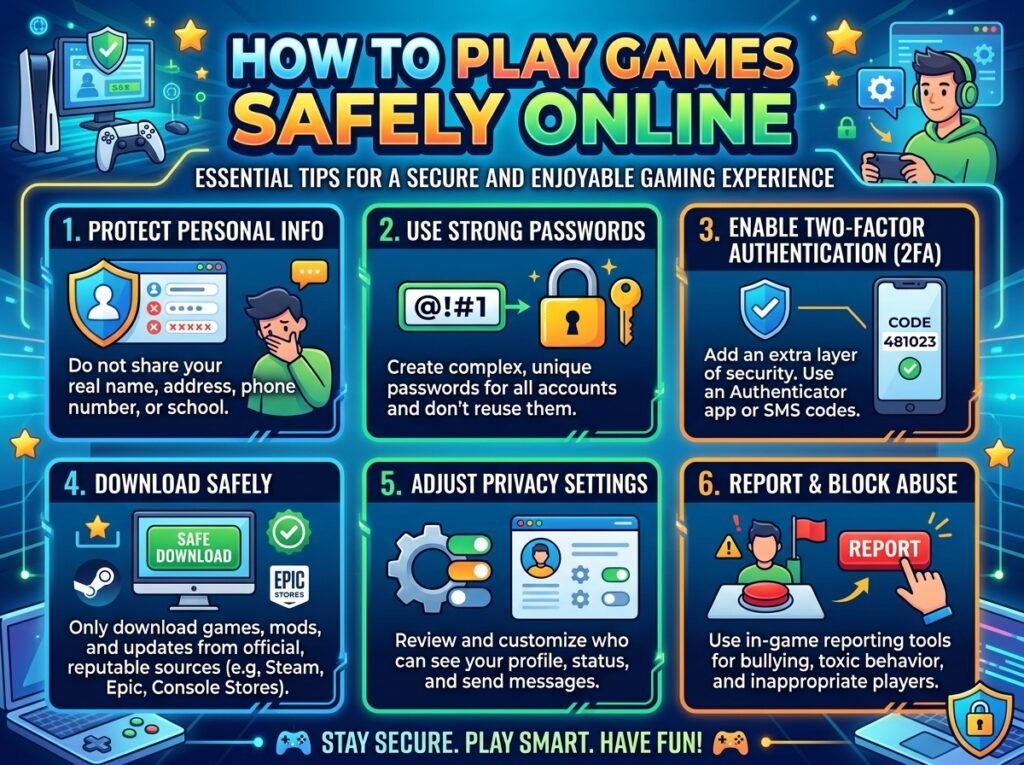
One of the easiest ways to stay safe is to share less. Many casual games do not need your full name, home address, phone number, school, or daily schedule. If a game asks for more personal information than makes sense, that is a red flag.
For kids and teens, this matters even more in chat features, usernames, and profiles. A username that includes your real name, birth year, or location can reveal more than you think. Something fun and random is better than something personal.
If the game lets you create an account, use a strong password that is different from your email or social accounts. Password reuse is one of the fastest ways a small gaming problem turns into a much bigger one. If two-factor authentication is available, turn it on.
Multiplayer games are fun because real people make them unpredictable. They can also make them messy. Not every player is there to play fair, and not every chat message deserves a response.
If someone is asking personal questions, pressuring you to move to another app, or offering free items in exchange for account details, that is not normal game behavior. It is usually a scam, social engineering attempt, or just plain creepy. Mute, block, and report when needed.
Parents should know that even games with a bright, cartoon look can include live interaction. Visual style does not always tell you how social a game is. A simple check of chat settings, friend requests, and multiplayer options can make a big difference.
Free games are great. Fake free stuff is not. A lot of gaming scams are built around urgency: claim this prize now, get unlimited coins, unlock a secret skin, win a gift card, verify your account immediately. The goal is usually to get your login, push a shady download, or collect payment info.
A good rule is this: if a reward feels bigger than the game itself, slow down. Real game platforms do not usually ask you to enter sensitive information just to collect a random bonus. They also do not need you to install strange browser extensions or “security tools” to keep playing.
This is where younger players need extra backup. Kids are more likely to click first and question later, especially when a reward is bright, loud, and timed. Parents can help by setting a simple rule: no entering information, no downloading extras, and no buying anything without checking first.
Safety is not only about scams and privacy. It is also about balance. Games are supposed to be a break, not something that wrecks your sleep, mood, or homework.
Browser games make it easy to say, “just one more round,” because there is no install time and no long setup. That is part of their charm. It also means sessions can stretch without you noticing. Setting a rough time limit before you start can help, especially for younger players.
The right limit depends on the person. A quick puzzle game after school is different from hours of late-night competitive play. If gaming starts cutting into sleep, school, work, exercise, or face-to-face time, that is a sign to reset the routine, not panic.
Short breaks help too. Stand up, drink water, look away from the screen, and give your hands a rest. It sounds basic because it is basic, and it works.
If your child plays online games, you do not need to hover over every click. What helps more is setting up a few clear guardrails. Keep devices in shared spaces when possible, talk about what kinds of chat are okay, and make sure your child knows they can tell you if something weird happens.
It also helps to play once or twice with them. You do not need to become a gaming expert. Just seeing the game in action tells you a lot about ads, chat, pace, and whether the content matches your kid.
For younger children, fewer features is often better. Games that offer instant play without account creation or open chat can reduce risk and keep the focus where it should be – on fun.
A lot of casual gaming happens on family laptops, school-friendly Chromebooks, or tablets that more than one person uses. Shared devices need extra care. Log out of accounts when you are done, avoid saving passwords in public or shared browsers, and do not leave payment details attached unless absolutely necessary.
Clearing browser data once in a while is not a bad move either, especially if multiple users jump in and out of game sites. It keeps sessions cleaner and lowers the chance of someone clicking into the wrong account.
Headphones can help with privacy in a different way. If a game has voice chat or loud ads, using headphones in a shared space can keep personal conversations and distractions to a minimum. For kids, though, open speakers may be better if a parent wants to stay aware of what is happening.
Sometimes the safest move is simply leaving. You do not need a technical reason. If a game site feels messy, confusing, or too aggressive, trust that instinct.
Warning signs include nonstop pop-ups, fake download buttons, requests for unusual permissions, forced sign-ups for simple games, and pages that keep redirecting somewhere else. The same goes for games that promise impossible rewards or pressure you to act instantly.
A clean, easy-to-use game experience is usually a better sign than a flashy one. For casual players, that matters. You are there to play, not to wrestle with ads, fake offers, or security headaches.
If you want the short version of how to play games safely, it comes down to a few habits: choose trusted platforms, protect your personal info, use strong passwords, ignore too-good-to-be-true rewards, and take breaks before fun turns into overload. None of that takes much time, and all of it makes online play smoother.
Gaming should feel easy. It should be fun to open a browser, pick something new, and start playing right away. A platform like DANY Games fits that casual style best when players bring the same energy to safety that they bring to Play – quick, smart, and ready for the next round.
The best safety tip is the one you will actually use, so keep it simple: if something feels off, pause before you click.